Skip to content

From ticket to solution · Part 1 of 2

From one line in the backlog to a plan we can trust.

AI agents write code in minutes. The question for you is whether the result can be trusted. We followed a real ticket at a customer in the transport sector, and the work began with the agent refusing to build.

By Niklas Andervang6 min read

Background

Speed is not the problem. Trust is.

Eight in ten developers use AI tools in their work. Yet only 29 per cent trust the answers to be accurate. A few years ago the figure was 40 per cent.[1]

Nor is the work always faster. The research institute METR asked 16 experienced developers to complete 246 real tasks in their own codebases. With AI tools, the work took 19 per cent longer. The developers had expected to be 24 per cent faster.[2]

We work with AI agents every day, in a frontend team of four at a large customer in the transport sector. An AI agent is an AI tool that carries out work in several steps: it reads, writes code and runs tests.

Our experience is simple. You can start a hundred agents on a hundred tickets. What works is about three tracks at a time, with clear stops where a person approves.

“A developer can guess. An agent guesses faster, and builds the guess.”
Niklas Andervang · Andervang Consulting

The map

Six steps. Two of them belong to a person.

The whole series follows one and the same ticket through these six steps.

  1. Step 1

    Ticket

    One line in the backlog.

    In this part

  2. Step 2

    Plan

    An agent checks the ticket, reads the code and plans.

    In this part

  3. Step 3A person approves

    Approval

    The product owner and the team approve the plan.

    In this part

  4. Step 4

    Build

    An agent builds to the plan.

    In part 2 →
  5. Step 5

    Review

    A different agent reviews against the plan.

    In part 2 →
  6. Step 6A person approves

    Pull request

    Another developer approves the change.

    In part 2 →

Each agent has one job. The plan agent never writes code. The review agent never changes code. Read more about how we work with AI agents and agentic workflows.

Step 1 of 6 · Ticket

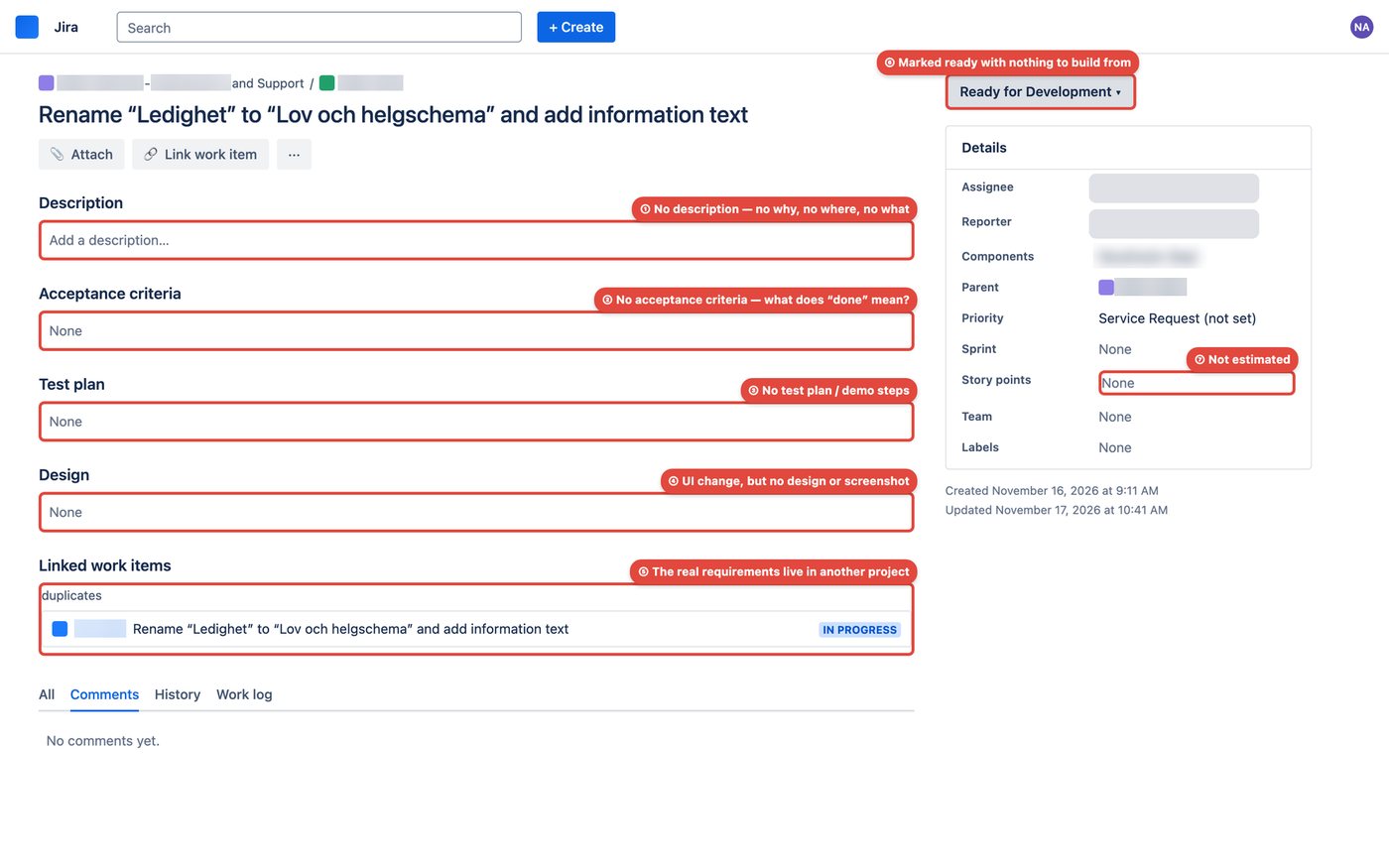
The ticket was marked ready. It contained a title.

In the list, the ticket looked finished. In reality there was nothing to build from.

The ticket had the status “Ready for Development” and a title. It had no description, no acceptance criteria, no test plan and no design. The real requirements sat in a linked ticket in another project.

The plan agent checked the ticket against eight points. The result: 0 of 8 met, 2 partly met and 6 missing.[3] So the agent stopped. No plan and no code until the ticket holds up.

The difference from a person matters. A developer who gets a thin ticket goes and asks. An agent that gets a thin ticket builds something anyway. It is fast, and it looks finished.

Screenshot of a ticket marked Ready for Development that contains only a title. Red labels show what is missing. (opens full size in a new tab)
The ticket as it arrived. The labels show what the plan agent was missing. The customer’s details are masked.

Step 2 of 6 · Plan

The plan agent read the code before it wrote a line.

Instead of guessing, the agent found out what the change actually involved.

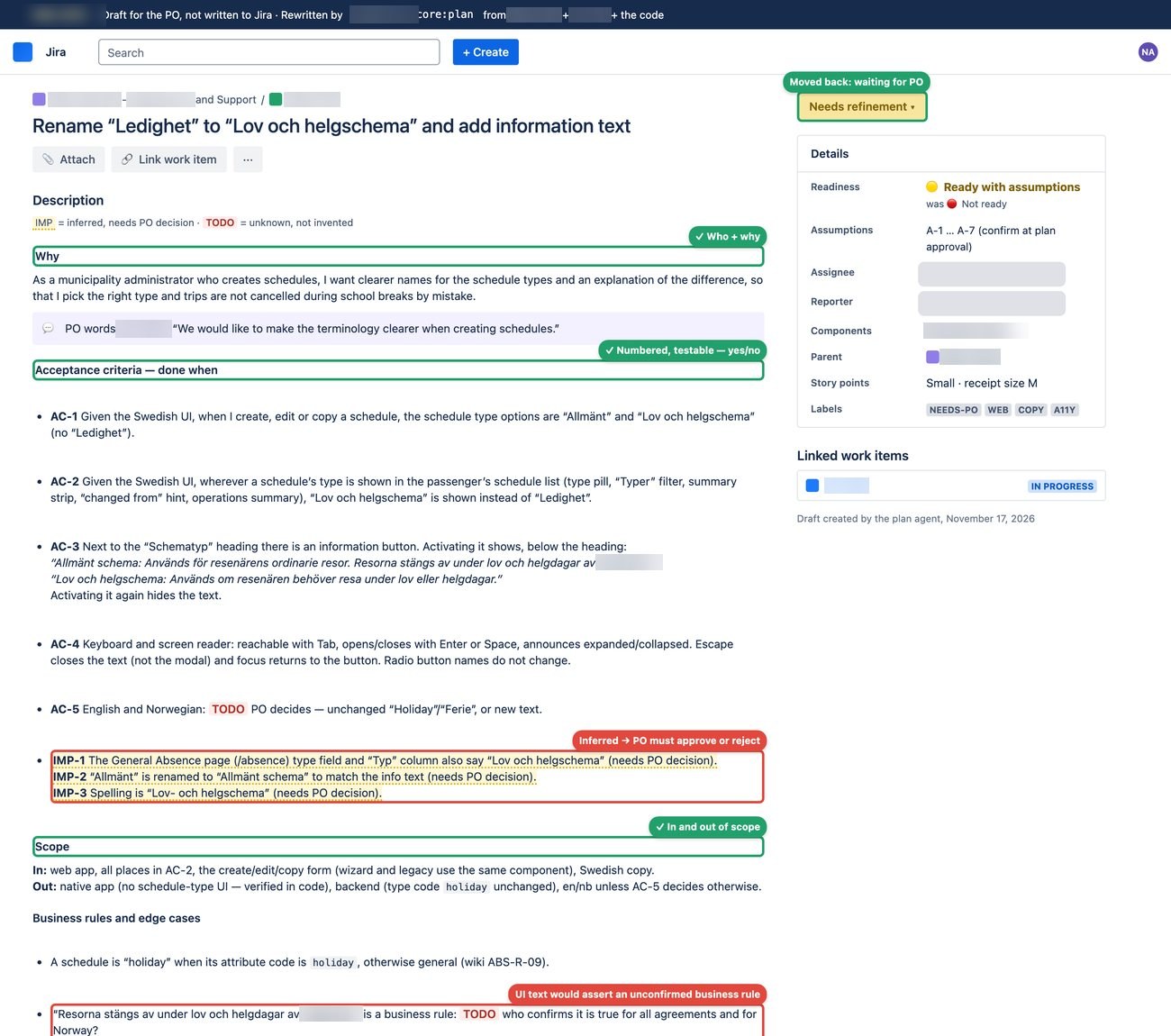
The ticket was about changing a piece of text in a form. The agent read both tickets, the documentation and the code. It found what the ticket did not say: the text appeared in 9 places, in 3 languages. A ready-made component for information text already existed, so nothing new had to be built.

Then the agent rewrote the ticket:

  • 5 acceptance criteria: what must be true when the work is done.
  • 3 assumptions the agent had made itself, clearly marked.
  • 7 questions for the product owner.
  • “TODO” where the answer was missing. Nothing was made up.
Screenshot of the same ticket after the plan agent, now with background, acceptance criteria and marked assumptions. (opens full size in a new tab)
The same ticket after the plan agent. It is a draft for the product owner. The agent wrote nothing in the ticket system.
checks met at the start
0 of 8checks met at the start
places in the code, not 1
9places in the code, not 1
questions for the product owner
7questions for the product owner
In depthWhat the agent reads, and with which tools

Give an agent a task and it solves exactly that task. In a complex business that is not enough, because a small change can collide with a rule in a completely different part of the system. So the agent reads three sources:

  • The ticket system answers what: the requirements, the decisions and the history.
  • The documentation answers why. Part of it lives as text files next to the code, where every rule has an ID and is marked as verified or unverified. The agents both read it and update it.
  • The code answers how. That is where the truth is.

Access goes through MCP, a standard way of connecting AI to other systems. Read MCP, explained, and what, how and why.

  • Tickets

    Jira via MCP

    The ticket, its links and its history.

  • Team documents

    Confluence via MCP

    What other teams own and have decided.

  • Rules

    A wiki next to the code

    Rules with an ID and a status.

  • Speed

    Code search

    Fast search across all the code.

  • Direction

    Knowledge graph

    Shows what a change will affect.

Step 3 of 6 · Approval

The plan names the evidence before the code exists.

Before any code is written, we decide how we will know that it turned out right.

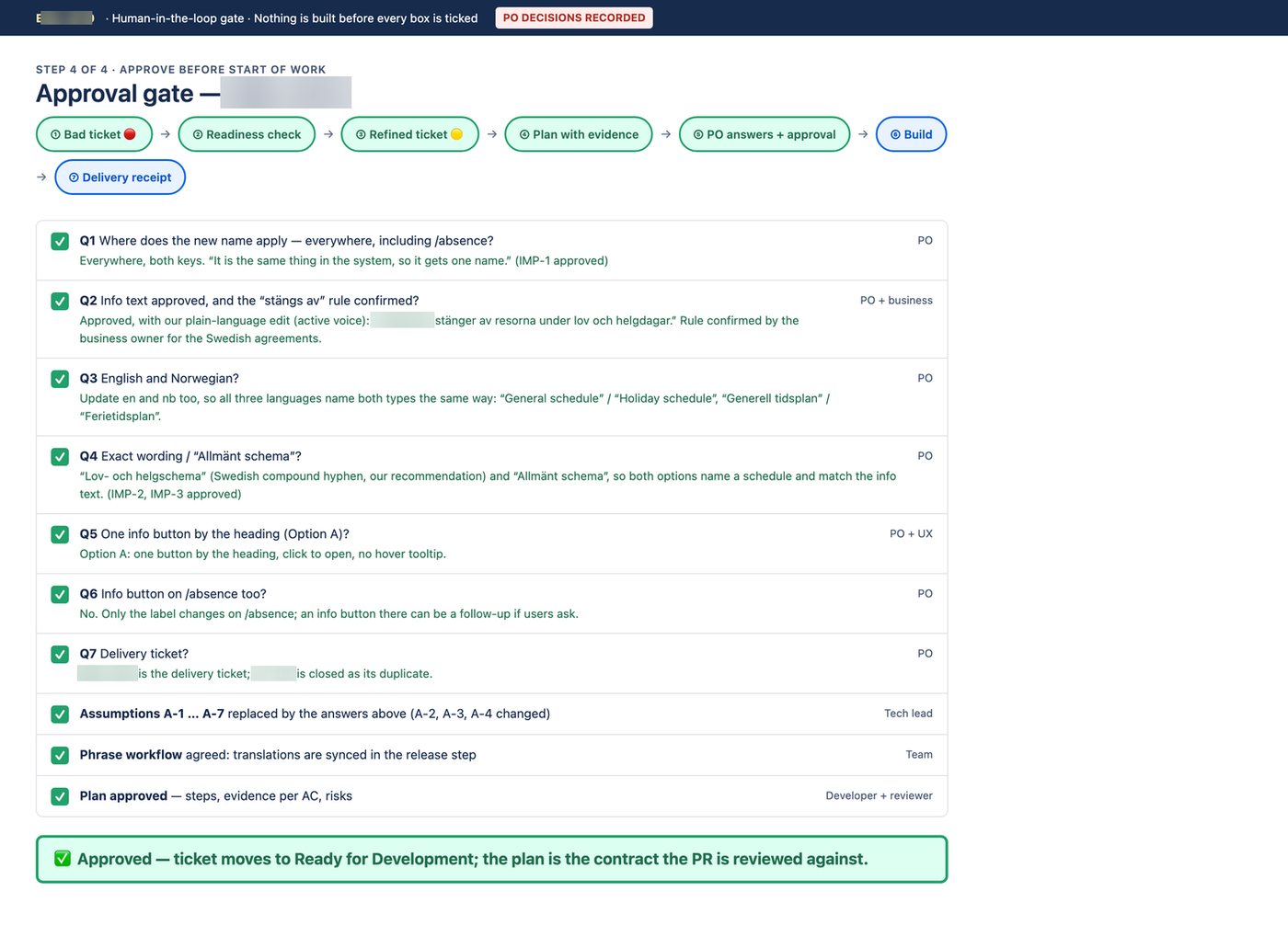
The plan lists nine requirements. For each one it says what evidence must exist when the work is done: a test, a screenshot or an updated rule in the documentation.

Then it is the people’s turn. The product owner answers the seven questions. The team approves the steps, the evidence and the risks. Ten boxes must be ticked before the agent is allowed to build.

Screenshot of the approval step, with the product owner’s decisions and the team’s approvals ticked. (opens full size in a new tab)
The approval. Only when the boxes are ticked may the build agent start.

The plan is the contract.

From here on, everything is compared with the plan. That is why the review in part 2 can say “partly met” instead of “looks good”.

The lesson

Three things decide the outcome.

Half the work was done before any code existed.

  • 01

    The right brief

    The ticket says what must become true. If that is missing, the agent stops.

  • 02

    The right tools

    The agent can reach the requirements, the documentation and the code.

  • 03

    Evidence

    Every requirement points at a test, a picture or a review.

Questions and answers

What you usually ask about tickets and agents.

What do you mean by an AI-ready ticket?

A ticket an agent can build from without guessing. The plan agent checks eight points, including the description, the acceptance criteria, the test plan and the design. If too much is missing, the work stops before any plan or code is written.

Why does the agent stop instead of doing its best?

Because an agent that guesses builds the guess in a few minutes, and then it looks finished. Asking the product owner seven questions is cheaper than reviewing a solution to the wrong problem.

How many agents do you run at once?

About three parallel tracks per developer: three tickets, repositories or areas. You can start more, but then no person can approve plans and review results at the same pace.

Do the agents write to our systems?

Only where you have decided they may. In this ticket the plan agent wrote a draft for the product owner and nothing in the ticket system. A person approved the plan before the build and the change before it went in.

Do we need the same tools as you?

No. What matters is that the agent can reach three things: the requirements and decisions, the documentation and the code. Which tools give it that access depends on what you already have.

Sources

What this article is built on

  1. [1]Stack Overflow, “Developers remain willing but reluctant to use AI: The 2025 Developer Survey results are here”, 29 December 2025. stackoverflow.blog
  2. [2]METR, “Measuring the Impact of Early-2025 AI on Experienced Open-Source Developer Productivity”, 10 July 2025. metr.org
  3. [3]Session log, git history, test runs and the pull request for the ticket, November 2026. The customer is anonymised.

About the numbers: the figures for the ticket come from the session log, the git history, the test runs and the pull request. The customer is anonymised, the screenshots are masked and the app ran on test data.

What do your tickets look like?

Tell us what a ticket looks like in your organisation today. We will show you how we would take it from backlog to pull request, with the evidence along the way.