

Why you should prioritise accessibility · Part 1 of 2
Why you should prioritise accessibility, part 1: the business case
By Niklas Andervang12 min read
I have worked in development for more than 15 years, and for the last four to five years I have focused specifically on accessibility. Through many projects with organisations such as Skandia, SJ, Riksbanken, Mars Inc and Axfood, I have seen at first hand how accessibility transforms not just digital experiences but entire businesses. This is part 1 of a two-part series based on my talk “Why You Should Prioritize Accessibility and the Tools to Get There”. In this part, we explore the business case for accessibility: debunking myths, understanding who benefits and examining why accessibility must be a priority.
- Accessibility
- A11y
- Inclusion
- WCAG
- Business Strategy
In this article27 sections
- 01Debunking the A11y myths
- 02Disability ≠ barrier to use
- 03The common myths we need to bust
- 04The ‘solve for one, extend to many’ philosophy
- 05There are no “normal users”
- 06Accessibility is consideration
- 07Universal design: the foundation
- 08User needs by category
- 09The world today demands accessibility
- 10Argument 1: a better experience for everyone
- 11What industry leaders say
- 12Real-world example: correct use of contrast
- 13Real-world example: click areas and touch targets
- 14Real-world example: subtitles and captions
- 15Real-world example: noise-cancelling technology
- 16Real-world example: focus-stealing features
- 17Argument 2: the missed market
- 18UK example: Europe’s largest digital market
- 19Argument 3: SEO benefits
- 20Specific SEO ♥ A11y overlaps
- 21Argument 4: your brand and values
- 22The value of accessibility for your brand
- 23Argument 5: laws and regulations
- 24Current law (Sweden): “DOS-lagen”
- 25The European Accessibility Act (EAA) – now in effect
- 26What’s next: part 2
- 27FAQs about accessibility
Debunking the A11y myths#
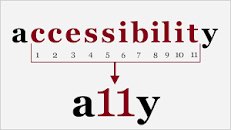
Before we go further, let’s clarify this not-so-accessible abbreviation, which you will see throughout this article. A11y is a numeronym: shorthand for “accessibility”. The “a” is the first letter, “11” stands for the eleven letters in between, and “y” is the last letter. It is pronounced “ally”, which is fitting, because that is exactly what we are trying to be: allies in creating inclusive digital experiences.
Disability ≠ barrier to use#
Here is a distinction that changes how we think about accessibility: a disability does not automatically mean a barrier to use. Barriers are created by society – through poorly designed environments, systems and services. Good accessibility in digital services gives us the opportunity to close this gap entirely.
Think of it this way: a wheelchair user is not kept out of a building by their disability, but by the decision to build stairs instead of a ramp. The same principle applies to digital services.
The common myths we need to bust#

When I mention accessibility to clients and teams, I often hear the same concerns. Let’s address the most common myths:
- Myth 1: “Accessibility is just for people in wheelchairs.” Reality: the wheelchair icon is one of the most common, and most misleading, associations with accessibility. Physical mobility is just one part of a much broader spectrum of needs.
- Myth 2: “Accessibility takes longer to create.” Reality: when it is built in from the start, accessible development does not take significantly longer. The real delays come when accessibility is treated as an afterthought and requires expensive retrofitting.
- Myth 3: “Accessibility is too hard.” Reality: some aspects are complex, but many accessibility improvements are straightforward and can be automated. The key is to demystify the topic and make learning accessible (pun intended).
A better word for accessibility is inclusion. Telling stakeholders “We work hard on inclusion” resonates differently from technical jargon.
The ‘solve for one, extend to many’ philosophy#
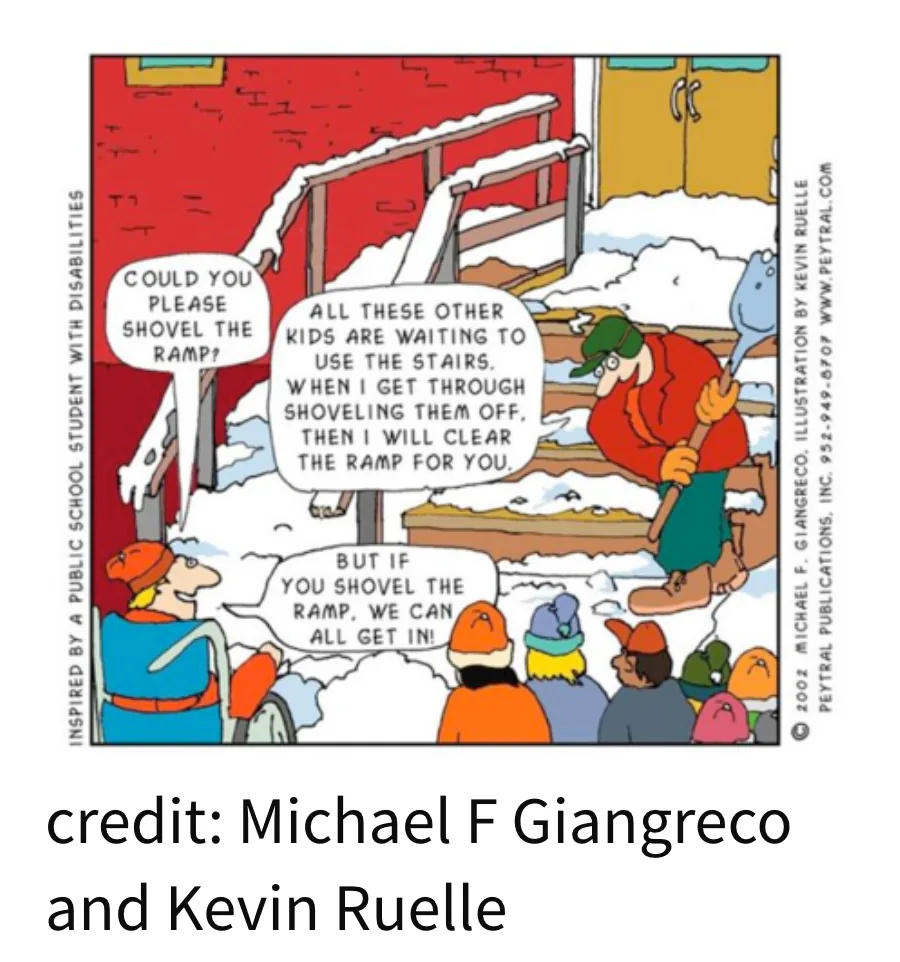
Imagine a schoolyard covered in snow. A boy who uses a wheelchair asks the person shovelling, “Could you please shovel the ramp?” The worker replies that he needs to clear the stairs first, for the “other kids”.
But here is the truth: if he clears the ramp, everyone can get in. The children can walk up the ramp. Parents with pushchairs can use it. A teacher wheeling in supplies on a trolley can use it. By solving for the person with the greatest difficulty, you solve for everyone.
This is the mindset we need for digital accessibility.
There are no “normal users”#
Clients often tell me that their target group is “normal users”. We need to stop thinking there is a special, separate group of users who need accessibility.
The uncomfortable truth: there are no normal users. Everyone is affected.
According to the WHO, about 1.3 billion people – roughly 1 in 6, or 16 per cent of the world’s population – live with a significant disability. But that covers only permanent disabilities. When you add temporary and situational impairments, the numbers grow considerably.
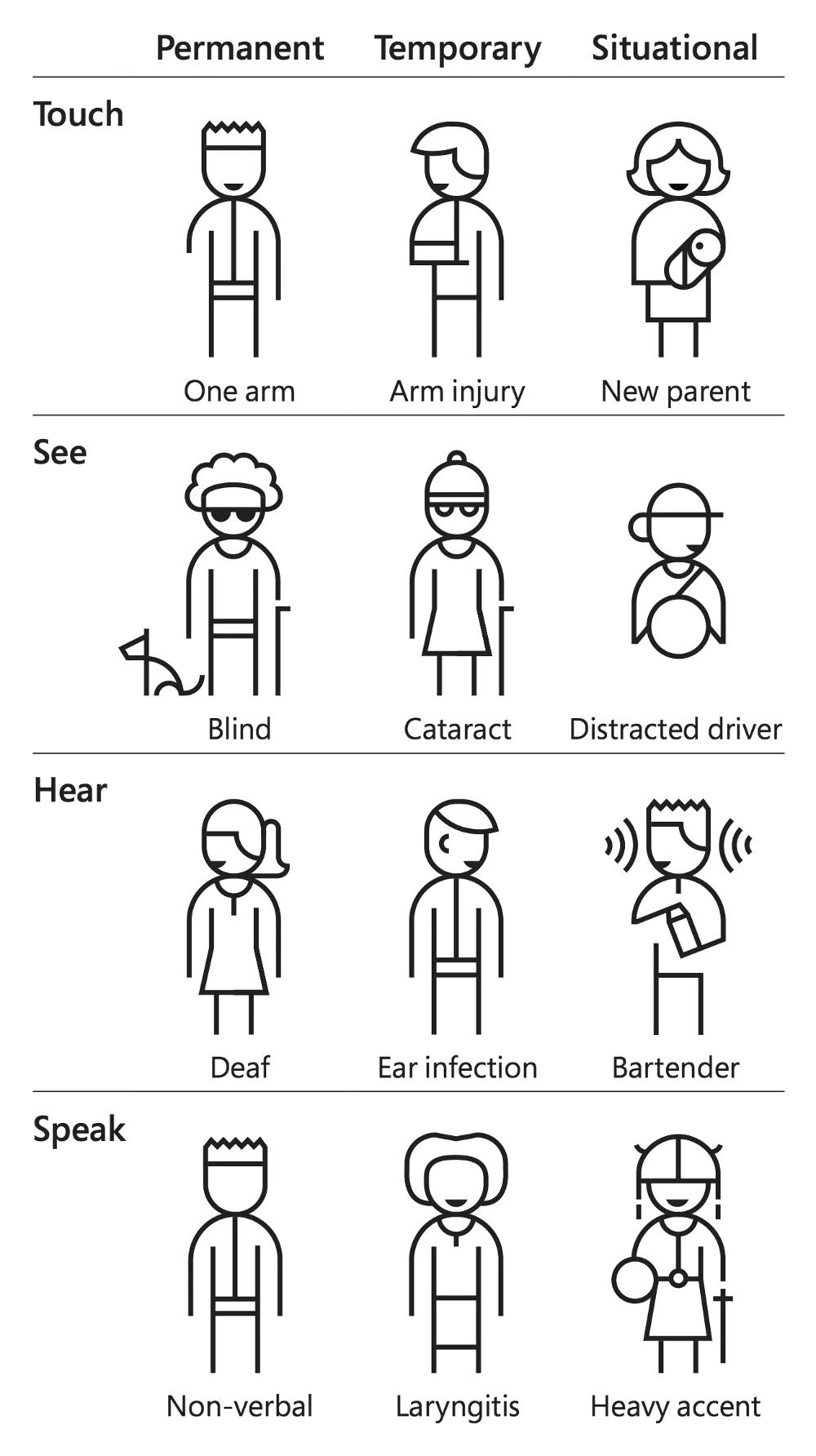
In reality, it could be you or me, now or in the future. Consider:
- Permanent: One arm → Temporary: Arm injury → Situational: Holding a baby while using a phone
- Permanent: Blind → Temporary: Cataract surgery → Situational: Bright sunlight on the screen
- Permanent: Deaf → Temporary: Ear infection → Situational: Noisy environment
Accessibility is consideration#
Accessibility is not only about disability. It is about considering and accommodating everyone who uses digital services and products:
- People under stress (for example, a parent juggling work and childcare)
- People with poor internet connections (in rural areas, in developing countries or simply where infrastructure is weak)
- People with different devices (old smartphones, slow computers, screen readers, sip-and-puff devices)
- People from different countries and cultures (non-native speakers, different reading directions)
- People without equal standing in society (economic barriers, educational gaps, social exclusion)
Social inclusion matters too. Rich or poor, everyone should be treated equally in the digital space.
Universal design: the foundation#
Universal design means designing and developing for everyone from the start – and in the end, everyone benefits. To achieve this:
- Get to know your users and understand all their needs
- Remember that user needs can be permanent, temporary or situational
- Stay informed and keep your clients informed about these realities
- Test with screen readers and other assistive technologies
- Let real users test and give feedback – their insights are invaluable
User needs by category#

Sight: Users need to be able to zoom and magnify content, increase contrast, change colours, or hear or feel content instead of seeing it.
Hearing: Sound should be easy to distinguish. Users may need to read and see rather than hear. Reduce noise and background sound. Provide captions and transcripts for videos.
Speech: Don’t make any function depend on speech alone. Provide alternatives to voice control and offer contact methods other than phone calls.
Motor: Make everything usable with a keyboard or other controls, not only a mouse. Offer voice commands as an option. Make touch and click targets large enough.
Cognition (the largest and hardest category): Keep it simple – avoid unnecessary complexity and distractions. Consider users with ADHD, autism, concussion, stress, anxiety or depression, or who are simply distracted.
The world today demands accessibility#
The global context makes accessibility more important than ever:
- Global pandemic: Long COVID has created cognitive needs for millions
- War and conflict: Refugee movements mean more users facing language barriers
- Growing inequality: More people with low digital confidence
- Ageing population: Hearing loss, sight loss, tremors and cognitive changes
We will all get there eventually. Designing for the future means designing for your future self.
Argument 1: a better experience for everyone#
Accessibility ≈ UX / UX ≈ Accessibility
I would argue that accessibility and user experience are essentially the same thing. Both are about making things as easy as possible to understand and use. With good UX thinking, you are already well on the way to good accessibility.
What industry leaders say#
Microsoft (Inclusive Design): “Solve for one, extend to many. Learn from human diversity. Design for people with permanent disabilities and it will benefit everyone.”
Google: “Awareness is everything.”
Apple: “Technology is most powerful when it can be used by everyone.”
All three stress the importance of looking beyond your own assumptions, perspective and norms. Avoid cognitive bias.
Real-world example: correct use of contrast#
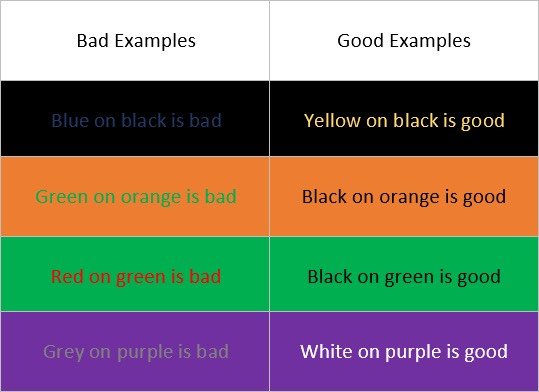
Colour and contrast are still problems today, yet they are among the easiest things to fix. Poor contrast can be physically painful to look at, and for some users low-contrast content is simply unreadable.
Who depends on this?
- People with low contrast sensitivity (common among older people)
- People who cannot distinguish between certain colours (“colour blindness”)
Additional benefits for everyone:
- Content works in different lighting conditions (sunlight, glare)
- Content is easier for everyone to read, even with perfect vision
Real-world example: click areas and touch targets#
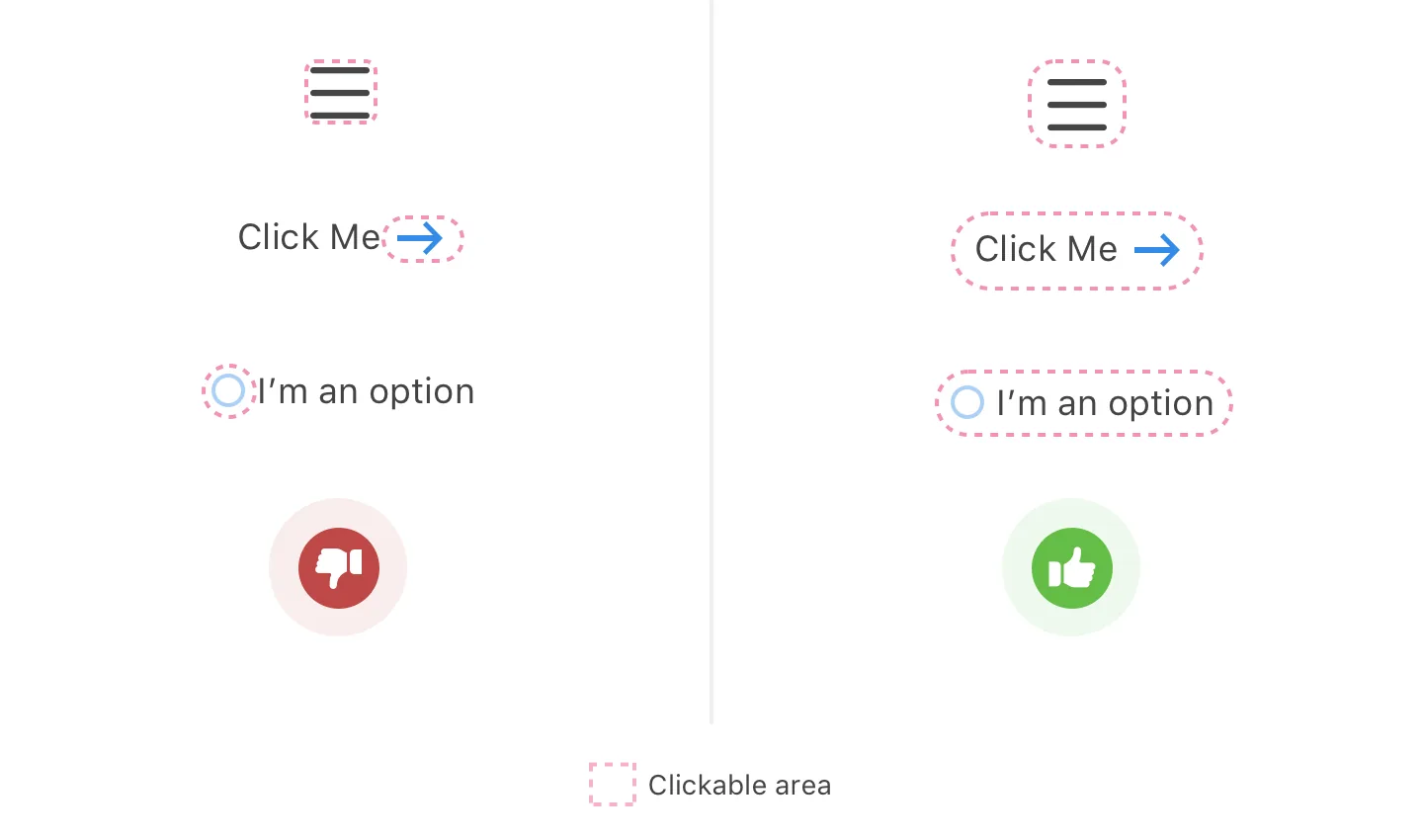
WCAG 2.2 sets a minimum target size of 24×24 CSS pixels at level AA, and recommends 44×44 pixels at level AAA. Generous targets are essential for:
- People with motor impairments
- Older people with hand tremors
- Everyone in stressful situations or using large phones, where some elements are hard to reach
Real-world example: subtitles and captions#
Subtitles serve many needs: non-native speakers, people who are deaf or hard of hearing, people whose speakers are not working, people in noisy environments and people who prefer reading to listening.
Real-world example: noise-cancelling technology#
Noise-cancelling headphones started out as a niche technology. Today they help people with hearing loss, tinnitus or difficulty concentrating – and they are a mainstream feature that everyone loves. Solutions that remove barriers for some tend to benefit the whole market.
Real-world example: focus-stealing features#
Autoplaying videos, animations, adverts, banners, pop-ups, CAPTCHAs, time limits – who actually likes these? They annoy everyone, but for people with cognitive disabilities, ADHD or anxiety they can be a real nightmare.
Argument 2: the missed market#
Let’s talk numbers. About 1 in 6 people worldwide (16 per cent, according to the WHO) live with a significant disability. That is a significant user base you may be excluding.
UK example: Europe’s largest digital market#
- 22 per cent (14 million people) in the UK have some kind of disability
- This does not include temporary or situational accessibility needs
- The real number is much higher
How big is your missed market?
Look at the disability statistics for each country where you operate and apply them to your own traffic data. That gives a rough estimate of how many potential users you are excluding today.
The most important takeaway: Almost everyone will experience accessibility needs at some point. The numbers do not stop at a simple “1 in 6” – the real market impact is far greater.
Argument 3: SEO benefits#
Search engine optimisation and accessibility have a lot in common. SEO is easy to sell to stakeholders – who doesn’t want more traffic?
Accessibility as a profession is growing, just as SEO specialist roles did years ago. It is now common for organisations to have an accessibility lead or specialist in the team.
Accessibility and search rankings go hand in hand. Google does not list accessibility as a ranking factor in itself, but many of the signals it does use – structure, text alternatives, performance and usability – are the same things accessibility work improves.
Specific SEO ♥ A11y overlaps#
Content is king: High-quality, relevant content is best for both SEO and accessibility. Relevant, easy-to-understand content improves both search rankings and usability.
Page titles: These must be unique and precise, and must describe the page. For accessibility, the title is the first thing screen reader users hear. For SEO, it is a critical ranking factor.
Link text: Links should be unique and state their purpose clearly. Stop using “Read more” and “Click here”. For accessibility, screen reader users often navigate by listing all the links on a page. For SEO, descriptive, keyword-rich links improve rankings.
Well-structured headings: Headings frame content and support navigation. For accessibility, users jump between headings to navigate. For SEO, headings map keywords to the relevant sections of content.
Alternative text: Alt text for images, charts and videos makes them readable for screen readers and search engine crawlers, so visual content becomes indexable and discoverable.
Avoid PDF format: PDFs are hard to make accessible for screen readers. HTML is easier for Google to index and gives you more control. Use HTML instead of PDF wherever possible.
Performance: Page load time is a key SEO ranking factor. For accessibility, fast loading is crucial for users with limited patience, users who find a high cognitive load difficult and users on slow connections.
Argument 4: your brand and values#
Diversity and inclusion are high on the agenda. Many companies claim to prioritise these values, but the claim falls apart when their website is not accessible.
Common examples: information available in only one language, job application forms that do not work for everyone, and content that requires specific assistive technology.
The value of accessibility for your brand#
Satisfied users and employees: Improving accessibility leads to more satisfied users and prouder employees. That is good for your brand.
Marketing and brand building: Inclusion must be one of your core values. There is a strong business opportunity in marketing yourself as the most accessible service in your industry. No one wants to be worst in class.
Recruitment benefits: Accessibility improves recruitment. Potential candidates can access all the information. A more inclusive recruitment process means you do not lose top talent because of an inaccessible website.
Customer care savings: This is where you can actually save money. Customer care is costly. When features do not work, users call for help, and special solutions may be needed. Users who almost reach their goal but hit a barrier will abandon the process, costing you customers and reputation.
Improved accessibility → an easier-to-use service → fewer costly customer care calls. An accessible service is also easier to maintain, and new team members are easier to onboard.
Argument 5: laws and regulations#
If the business arguments are not enough, there is also the law. Accessibility is governed by many laws and regulations, which vary by country and region.
Current law (Sweden): “DOS-lagen”#
The EU Web Accessibility Directive (2016/2102) is implemented in Sweden as the law on accessibility to digital public services, known as “DOS-lagen” (2018:1937). It applies to public sector websites and apps, and to some publicly funded organisations. The requirements follow the harmonised standard EN 301 549, which references WCAG 2.1 AA, and every service needs an accessibility statement.
What we have learned: Many organisations were not prepared, and the supervisory authority (DIGG) has reviewed services and required corrections. Improving accessibility takes time – it is not a one-off fix.
The European Accessibility Act (EAA) – now in effect#
This is significant legislation. Since June 2025, accessibility requirements have applied to the private and commercial sector. If you operate in the EU and have not yet addressed accessibility compliance, you are now at legal risk.
- Adopted: 2019
- Deadline for national legislation: 28 June 2022
- Applies from: 28 June 2025
- Directive: 2019/882
- Status: now applies and is enforced by national authorities
The EAA covers a wide range of products and services:
- Computers and operating systems
- ATMs, ticketing machines and check-in machines
- Smartphones
- TV equipment related to digital television services
- Telephony services and related equipment
- Audiovisual media services (television broadcasting and related equipment)
- Air, bus, rail and waterborne passenger transport services
- Consumer banking services
- E-books
- E-commerce (a major benefit for people who depend on online shopping)
Many organisations are still catching up with EAA compliance. The work required is substantial and ongoing – it is not a one-off fix. Start closing accessibility gaps now to avoid legal consequences and, more importantly, to serve all your users better.
What’s next: part 2#
Now that we understand why accessibility matters – for UX, market reach, SEO, brand value and legal compliance – the next question is how to implement it in practice.
In part 2: strategy and tools, we will explore:
• How to establish accessibility as a central organisational role
• Coordination strategies across design, development and content teams
• Automation tools and testing frameworks
• Checklists, documentation and templates
• Practical recommendations for getting started
Remember the fundamental truth: “There are no normal users. Everyone is affected.”
Continue to part 2 to learn how to turn these business arguments into practical implementation strategies.
FAQs about accessibility#
Isn’t accessibility just for people with permanent disabilities?
No. Everyone experiences accessibility needs at some point, whether permanent, temporary or situational. A broken arm, bright sunlight, holding a baby, working in a noisy environment or simply ageing can all create accessibility needs. By designing inclusively, we create better experiences for everyone.
Will focusing on accessibility slow down our development process?
When it is built in from the start, accessibility does not significantly slow development. The real delays come when it is treated as an afterthought and requires expensive retrofitting. Think of it as “shift left”: address accessibility early in the design phase, and development runs more smoothly.
What’s the ROI of investing in accessibility?
The return on investment includes wider market reach (about 1 in 6 people live with a disability), better SEO and search rankings, lower customer service costs, a stronger brand reputation, legal compliance (avoiding fines) and better code quality overall. Many organisations see higher conversion rates and customer satisfaction.
What’s the difference between WCAG levels A, AA and AAA?
WCAG has three conformance levels: Level A (basic), Level AA (the standard for most legal requirements, including the EAA) and Level AAA (enhanced). Most organisations should target WCAG 2.2 Level AA. EN 301 549 currently references WCAG 2.1 AA, and 2.2 adds a handful of criteria on top, so meeting 2.2 covers both.
How does the European Accessibility Act (EAA) affect my business?
The EAA has been in effect since June 2025. If you operate in the EU and offer products or services in sectors such as e-commerce, banking, transport, telephony or digital content, you must comply. Non-compliance can result in significant fines. If you have not started yet, start now.
Sources
What this article is built on
- [1]Web Content Accessibility Guidelines (WCAG) w3.org
- [2]Microsoft Inclusive Design Toolkit microsoft.com
- [3]GOV.UK accessibility personas gov.uk
- [4]European Accessibility Act information ec.europa.eu
- [5]WebAIM resources webaim.org
- [6]IAAP (International Association of Accessibility Professionals) accessibilityassociation.org